

Introduction
Learning how to create a logo with AI is easier than ever in 2026. AI-powered logo generators allow beginners, freelancers, startups, and business owners to design professional-looking logos without expensive software or advanced graphic design skills. With just a few clicks, you can explore creative logo ideas, customize colors and fonts, and build a visual identity for your business.
Fortunately, artificial intelligence has made logo design easier and more accessible. Today, you can create a logo with AI using online tools that generate creative logo ideas in just a few minutes. You do not need advanced graphic design skills or expensive software to get started.
Whether you are launching an online store in the USA, starting a small business in the UK, building a personal brand in Canada, or developing a startup in Europe, free AI logo generators can help you explore professional-looking designs.
In this guide, we will explore the five best AI logo generators in 2026, compare their features, explain how to create a logo step by step, and share practical tips for choosing the right design for your business.
Table of Contents
- Why AI Logo Design Matters in 2026
- What Is an AI Logo Generator?
- Top 5 Free AI Logo Generators in 2026
- Benefits of Creating a Logo with AI
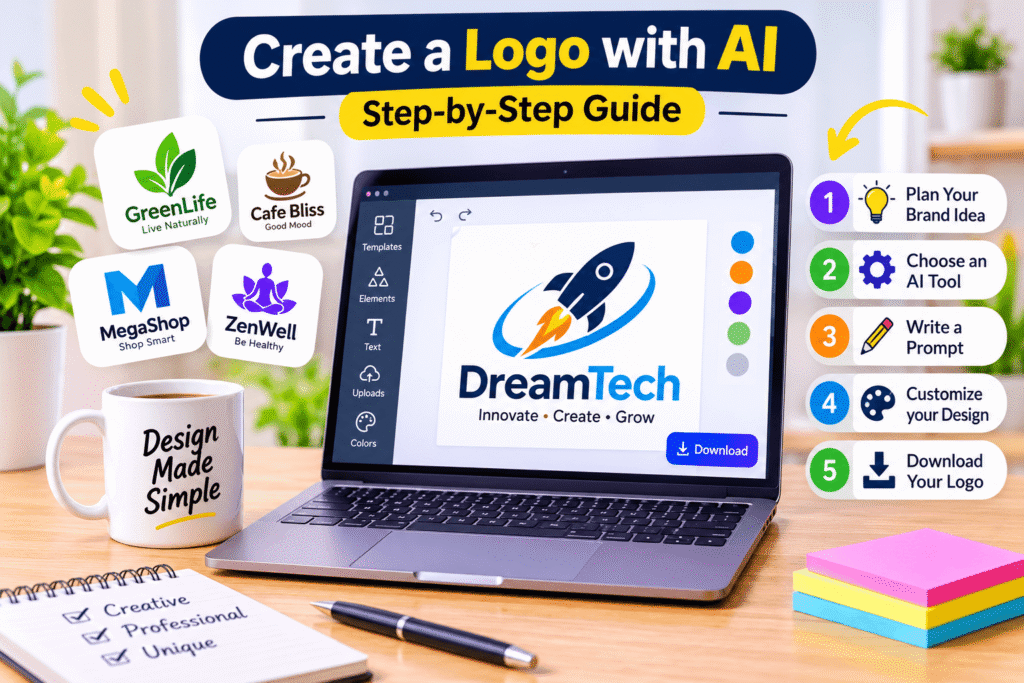
- How to Create a Logo with AI: Step-by-Step Guide
- Common AI Logo Design Mistakes to Avoid
- Practical Logo Design Checklist
- Frequently Asked Questions
- Create Your Brand Identity
- Conclusion
Why AI Logo Design Matters in 2026
Branding is more important than ever. Customers interact with businesses through websites, social media platforms, online advertisements, packaging, and digital marketplaces.
A consistent visual identity helps businesses appear trustworthy and professional across these channels.
However, many small businesses cannot afford a complete branding package when they first launch. AI-powered design tools provide an affordable starting point.
Here is why AI logo design has become popular:
- Affordable branding: Many platforms provide free logo creation options.
- Faster design process: AI can generate multiple logo concepts quickly.
- Beginner-friendly tools: Most platforms offer simple interfaces.
- Creative inspiration: AI helps users explore different styles and visual directions.
- Easy customization: Users can adjust fonts, colors, icons, and layouts.
For example, a small bakery in London can explore warm, friendly logo concepts, while a technology startup in Toronto can experiment with modern typography and geometric symbols.
The biggest advantage is flexibility. You can explore different branding ideas before investing in professional design services.
What Is an AI Logo Generator?
An AI logo generator is an online design tool that uses artificial intelligence, automated recommendations, templates, or machine-learning technology to help create logo concepts.
Depending on the platform, you can enter your business name, select an industry, describe your preferred style, and choose colors or symbols.
The tool then generates design suggestions that you can customize.
For example, imagine you own a coffee shop called “Urban Bean.”
You might provide these design preferences:
- Business name: Urban Bean
- Industry: Coffee and beverages
- Preferred colors: Dark brown and cream
- Design style: Minimalist and modern
- Symbol: Coffee cup or coffee bean
- Typography: Clean and bold
The AI tool can use this information to suggest several logo concepts.
However, remember that not every online logo maker uses fully generative AI. Some combine AI recommendations with traditional templates and customization features. Both approaches can be useful for beginners.
Top 5 Free AI Logo Generators in 2026
Choosing the right tool depends on your budget, design preferences, customization requirements, and download options.
Here are five useful platforms worth exploring in 2026.
1. Canva AI Logo Generator
Canva is one of the most popular online graphic design platforms. Its AI logo generator allows users to describe their ideas through text prompts and explore different logo concepts.
It is particularly useful for beginners, content creators, marketers, and small business owners.
Key Features:
- AI-powered logo generation.
- Easy-to-use editing interface.
- Customizable fonts and colors.
- Thousands of design templates.
- Social media and marketing design tools.
- Options to download and save designs.
How to use Canva:
- Visit the Canva AI Logo Generator.
- Sign in to your Canva account.
- Enter a description of your desired logo.
- Generate different design concepts.
- Choose your preferred design.
- Customize the typography, colors, and layout.
- Download your finished logo.
Best For: Beginners, bloggers, freelancers, and small businesses that want flexible design options.
Free Plan Limitations: Some templates, graphics, and advanced features require Canva Pro. For a business logo, check the licensing restrictions on individual design elements. Canva’s library content generally cannot be claimed as an exclusive trademark, apart from permitted elements such as basic shapes, lines, and fonts.
2. Adobe Express Logo Maker
Adobe Express is another excellent option for creating professional-looking logos without complicated design software.
It combines customizable logo templates, design tools, and AI-powered features. Users can enter a business name, select an industry, choose a visual style, and explore generated logo ideas.
The platform also allows further editing through its online design editor.
Key Features:
- AI-assisted logo design features.
- Professionally designed logo templates.
- Custom fonts and color combinations.
- Easy editing and customization.
- PNG, JPG, and PDF download options.
- Additional graphic design tools.
How to use Adobe Express:
- Open the Adobe Express Logo Maker.
- Enter your business or brand name.
- Add a slogan if required.
- Select a suitable visual style.
- Explore the generated logo ideas.
- Customize your preferred design.
- Download the completed logo.
Best For: Small businesses, marketing professionals, freelancers, and users who want more editing flexibility.
Free Plan Limitations: Some premium assets and advanced features require a subscription. Check the available export options before finalizing your design.
3. Namecheap Logo Maker
Namecheap Logo Maker is a useful option for entrepreneurs who want to create and download logos without paying for a basic design.
Its AI-powered process generates logo suggestions based on your business information and selected design preferences.
You can experiment with different fonts, icons, layouts, and color combinations.
Key Features:
- AI-generated logo concepts.
- Free logo downloads.
- No watermark on downloaded designs.
- Customizable typography.
- Different color combinations.
- PNG and SVG file options.
- Business card and website previews.
How to use Namecheap Logo Maker:
- Visit the Namecheap Logo Maker website.
- Enter your business name.
- Select suitable fonts and visual preferences.
- Choose your preferred colors.
- Allow the tool to generate logo concepts.
- Review and customize the available designs.
- Sign in to your Namecheap account and download your logo.
Best For: Startups, freelancers, entrepreneurs, and small businesses looking for an affordable logo creation solution.
Free Plan Limitations: You need a free Namecheap account to download your design. Although the platform provides free downloads, review the applicable usage terms and trademark restrictions before using a design commercially.
4. Shopify Logo Maker
Shopify Logo Maker is a convenient option for entrepreneurs, especially those launching online stores.
The platform offers ready-made logo concepts that users can customize according to their business identity.
Although it is more template-driven than a fully generative AI image tool, its automated recommendations make the design process simple.
Key Features:
- Free logo creation.
- Industry-based design suggestions.
- Customizable fonts and colors.
- Different logo layouts.
- Transparent background PNG options.
- Multiple logo variations.
Easy download process.
How to use Shopify Logo Maker:
- Visit the Shopify Logo Maker website.
- Enter your business name.
- Select your business industry.
- Choose a visual style.
- Browse the suggested designs.
- Customize your preferred logo.
- Finalize your design and download the logo files.
Best For: E-commerce businesses, online stores, dropshipping entrepreneurs, and new business owners.
Free Plan Limitations: The editor offers fewer advanced customization options than dedicated professional design software. It primarily provides PNG downloads rather than a complete professional vector branding package.
5. Wix Logo Maker
Wix Logo Maker is another helpful option for entrepreneurs who want to explore customized logo concepts.
It uses an assisted design process to recommend logos based on your business information, industry, and preferred visual style.
Users can experiment with different layouts, fonts, and colors before choosing a final design.
Key Features:
- Assisted logo generation.
- Business-specific design suggestions.
- Customizable fonts and colors.
- Different logo layouts.
- Website branding integration.
- Logo previews and editing options.
How to use Wix Logo Maker:
- Visit the Wix Logo Maker platform.
- Enter your business information.
- Describe your preferred logo style.
- Review the available logo suggestions.
- Select a design that matches your brand.
- Customize its colors, text, and layout.
- Preview the result and check the available download plans.
Best For: Entrepreneurs, website owners, freelancers, and businesses already using Wix.
Free Plan Limitations: You can explore designs and use a small sample file, but downloading high-resolution professional logo files requires purchasing a logo plan.
Quick Comparison: Best Free AI Logo Generators
Tool Best For Free Option
Canva Creative customization Free features with premium restrictions
Adobe Express Professional editing Free logo creation and downloads
Namecheap Free logo downloads Free account required
Shopify E-commerce branding Free logo creation and downloads
Wix Website branding Free preview, paid full downloads
Important: Free features, export formats, and commercial-use rights can change. Always check the current terms before using a logo for business purposes.
Benefits of Creating a Logo with AI
AI logo generators offer several advantages, particularly for new businesses and individuals with limited design experience.
1. Save Time and Money
Traditional logo design may involve hiring a designer, discussing concepts, reviewing revisions, and paying professional fees.
AI tools help you explore initial concepts quickly without committing to a large design budget.
2. Easy for Beginners
You do not need advanced knowledge of Photoshop, Illustrator, or other professional design applications.
Most tools guide you through simple steps.
3. Explore Different Creative Ideas
AI can suggest different visual directions, helping you discover colors, fonts, and symbols that suit your business.
4. Create Consistent Branding
Once you select your logo, you can use it across your website, business cards, packaging, social media, and marketing materials.
5. Work from Almost Anywhere
Most online logo generators work through a web browser. This makes them convenient for entrepreneurs and remote teams across the USA, Canada, Europe, and the UK.
How to Create a Logo with AI: Step-by-Step Guide
Using an AI logo maker is simple. However, producing a logo that communicates your brand effectively requires some planning.
Follow these practical steps.
Step 1: Understand Your Brand Identity
Before opening a logo generator, think about what your business represents.
Ask yourself:
- What products or services do I offer?
- Who are my target customers?
- What makes my business different?
- What personality should my brand communicate?
For example, a children’s clothing brand may need a playful identity, while a financial consultancy might benefit from a clean and trustworthy appearance.
Step 2: Choose the Right AI Logo Generator
Select a tool based on your requirements.
For example:
- Choose Canva for creative flexibility.
- Choose Adobe Express for editing options.
- Choose Namecheap for free logo downloads.
- Choose Shopify for e-commerce branding.
- Choose Wix for website-related branding.
Compare download formats and licensing terms before making your final choice.
Step 3: Write a Detailed AI Logo Prompt
A clear prompt helps an AI tool understand your design preferences.
Instead of writing something basic like “Create a business logo,” explain your requirements.
Example AI Logo Prompt:
“Create a modern minimalist logo for a coffee brand called Urban Bean. Use dark brown and cream colors with a simple coffee bean symbol. Choose elegant typography, balanced spacing, and a clean professional appearance. The design should be memorable, readable, and suitable for packaging, websites, and social media.”
You can change the business name, industry, colors, and visual style according to your requirements.
Step 4: Generate Multiple Logo Concepts
Do not immediately select the first result.
Explore several variations and compare their appearance.
Look for designs that:
- Communicate your business identity.
- Use readable typography.
- Have balanced proportions.
- Work well at small sizes.
- Avoid unnecessary decorative elements.
Step 5: Customize Your Selected Logo
Once you find a suitable concept, improve it.
Adjust the font, icon, colors, spacing, and layout.
A good logo should look attractive without becoming complicated.
Step 6: Download the Correct File Formats
Your logo should work across different digital and print applications.
Consider downloading:
- PNG for websites and digital platforms.
- Transparent PNG for flexible placement.
- SVG for scalable vector applications.
- PDF for suitable print workflows.
Not every free plan offers all these formats. Check the available export options before choosing a platform.
Step 7: Test Your Logo Across Different Platforms
Finally, preview your logo in different situations.
Check how it looks on:
- Your website header.
- Social media profile pictures.
- Business cards.
- Product packaging.
- Email signatures.
- Marketing materials.
If the logo becomes difficult to read when reduced in size, simplify it.
Common AI Logo Design Mistakes to Avoid
Although AI makes logo creation easier, it does not automatically guarantee a strong brand identity.
Avoid these common mistakes.
1. Choosing an Overcomplicated Design
Too many colors, shapes, and decorative elements can make a logo confusing.
Keep your design simple and recognizable.
2. Ignoring Typography
Your business name should be easy to read. Avoid decorative fonts that make letters difficult to recognize.
3. Using Generic AI Symbols
AI-generated designs may resemble existing logos or common industry symbols.
Explore different concepts and customize the result to make your brand more distinctive.
4. Forgetting Mobile Compatibility
Many customers discover businesses through smartphones.
Test your logo at smaller sizes before publishing it.
5. Ignoring Licensing and Trademark Issues
A free download does not automatically mean exclusive ownership or trademark protection.
Review the platform’s licensing conditions and check whether similar trademarks already exist in your target markets.
For international businesses, WIPO provides a useful starting point for trademark searches. Businesses operating in the United States can also consult the USPTO database.
Practical AI Logo Design Checklist
Before publishing your logo, use this checklist:
- The logo represents my business identity.
- The business name is spelled correctly.
- The typography is readable.
- The color combination is consistent.
- The design looks professional and simple.
- The logo works on mobile devices.
- The design looks good on light and dark backgrounds.
- I have downloaded suitable file formats.
- I have checked the licensing conditions.
- I have investigated similar existing trademarks.
- The logo works across websites and social media.
Frequently Asked Questions
1. Can I create a logo with AI for free?
Yes. Several platforms offer free logo creation options. Canva, Adobe Express, Namecheap, and Shopify provide useful free features. However, some tools restrict advanced editing, export formats, or commercial usage.
2. What is the best free AI logo generator in 2026?
The best option depends on your requirements. Canva is useful for creative customization, Adobe Express offers flexible editing, and Namecheap is a strong option for free logo downloads.
3. Can I use an AI-generated logo for my business?
Yes, provided the platform’s licensing terms allow your intended use. Before publishing a logo, check the usage rights of its icons, fonts, templates, and other design elements.
4. Do AI logo generators create high-resolution logos?
Some platforms offer high-quality PNG, SVG, or PDF downloads. However, free plans may restrict certain formats or resolutions. Always check the available export options.
5. Can I trademark a logo created with AI?
Potentially, but eligibility depends on the applicable country’s laws, the human contribution to the design, and whether the logo conflicts with existing trademarks. Consult an intellectual property professional before relying on an AI-generated logo for trademark protection.
Create Your Brand Identity
Your logo is more than a graphic. It represents your business, communicates your values, and helps customers recognize your brand.
If you are starting a new business, launching an online store, or refreshing your existing branding, AI logo generators can provide an affordable starting point.
Explore the tools discussed in this guide, experiment with different design ideas, and choose a logo that reflects your business personality.
Need a more distinctive and professional brand identity? Visit Design Made Simple to explore practical design tutorials, creative resources, AI tools, and branding guidance that can help you develop your next design project.
Start creating today and give your business a visual identity that customers can remember.
Conclusion
Learning how to create a logo with AI is easier than ever in 2026. Modern logo generators allow beginners, freelancers, marketers, and business owners to explore professional-looking designs without expensive software or advanced design knowledge.
Canva, Adobe Express, Namecheap, Shopify, and Wix each offer different advantages. Some focus on AI-powered creativity, while others provide simple templates and customization options.
However, choosing a free logo generator is only the first step. You should also consider brand consistency, readability, file formats, licensing, and trademark availability.
Take your time, explore different concepts, and customize your final design carefully. A simple, memorable, and well-planned logo can become a valuable part of your business identity for years to come.