
Introduction
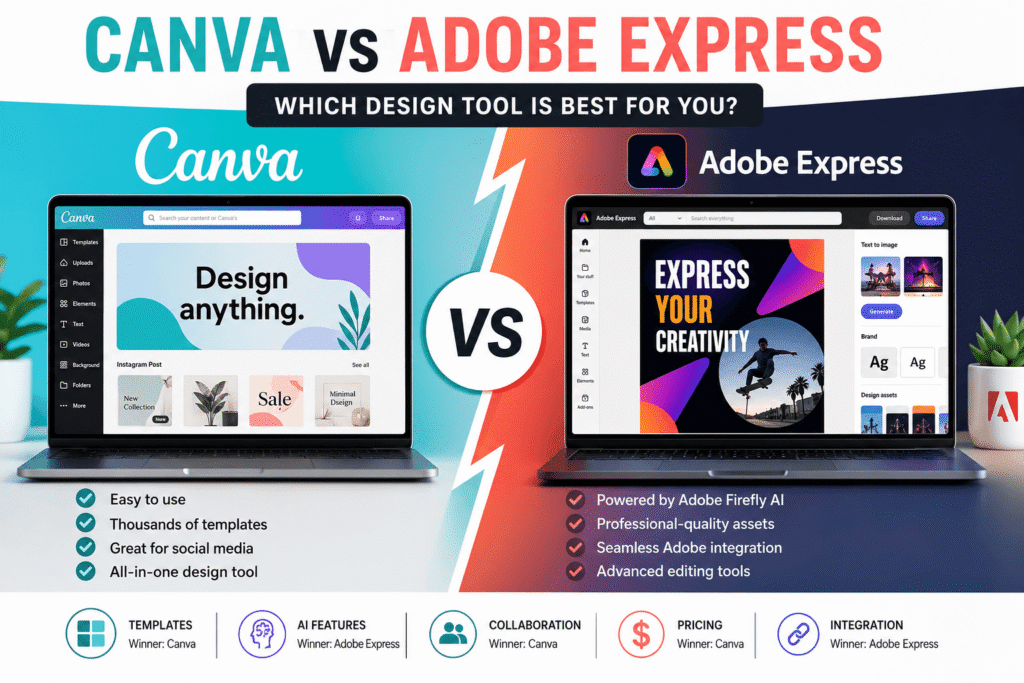
If you’re searching for the best online graphic design platform, you’ve probably come across the Canva vs Adobe Express debate. Both tools make it easier than ever to create professional graphics without years of design experience. Whether you’re a beginner, marketer, freelancer, content creator, or small business owner, choosing the right platform can save time, improve creativity, and help you produce high-quality visuals.
In recent years, AI-powered design features, ready-made templates, and cloud-based collaboration have transformed the way people create content. Instead of relying on complex desktop software, users can now design social media posts, presentations, logos, flyers, videos, and marketing materials directly in their browsers.
So, which platform offers better value? Is Canva still the king of easy design, or has Adobe Express become the smarter choice with Adobe’s creative ecosystem and AI innovations?
In this detailed comparison, we’ll explore the strengths, weaknesses, pricing, AI capabilities, ease of use, and ideal users for each platform. By the end, you’ll know exactly which design tool fits your needs.
Table of Contents
- Why This Comparison Matters
- What Is Canva?
- What Is Adobe Express?
- Canva vs Adobe Express: Feature Comparison
- Ease of Use
- Templates and Assets
- AI Features
- Pricing Comparison
- Pros and Cons
- Which Tool Should You Choose?
- Best Practices
- Common Mistakes
- Practical Checklist
- FAQs
- Conclusion
Why Canva vs Adobe Express Matters
Choosing the right design software isn’t just about aesthetics—it’s about productivity, efficiency, and achieving professional results with minimal effort.
Today, businesses across the USA, Canada, the UK, and Europe rely heavily on visual content for:
- Social media marketing
- Digital advertising
- Website graphics
- Business presentations
- Email campaigns
- Product promotions
- Brand identity
- Educational materials
The right platform can help you:
- Create professional designs faster
- Maintain consistent branding
- Collaborate with team members
- Reduce design costs
- Improve marketing performance
- Access AI-powered creative tools
As both Canva and Adobe Express continue to evolve, understanding their differences is more important than ever.
Canva vs Adobe Express – Understanding the Basics
Before comparing features, let’s take a quick look at what each platform offers.
What Is Canva?
Canva is one of the world’s most popular online graphic design platforms. It was built to make design accessible to everyone, regardless of technical experience.
Its intuitive drag-and-drop interface, extensive template library, and collaboration tools have made it a favorite among:
- Small businesses
- Teachers
- Students
- Freelancers
- Content creators
- Marketing teams
- Non-profit organizations
Canva supports thousands of design formats, including:
- Instagram posts
- Facebook ads
- YouTube thumbnails
- Posters
- Business cards
- Infographics
- Presentations
- Videos
- Whiteboards
- Documents
One of Canva’s biggest strengths is its massive collection of templates that help users create polished designs within minutes.
What Is Adobe Express?
Adobe Express is Adobe’s cloud-based design platform, created for users who need professional-looking graphics without the learning curve of advanced software like Photoshop or Illustrator.
It combines Adobe’s design expertise with easy-to-use editing tools, allowing users to create:
- Social media graphics
- Marketing materials
- Promotional videos
- Web banners
- Flyers
- Logos
- Presentations
- PDFs
- Business documents
A major advantage of Adobe Express is its seamless integration with the Adobe Creative Cloud ecosystem. Users can easily move projects between Adobe Express, Photoshop, Illustrator, and other Adobe applications.
Adobe has also introduced powerful AI features through Adobe Firefly, enabling users to generate images, remove backgrounds, and create visual effects with simple text prompts.
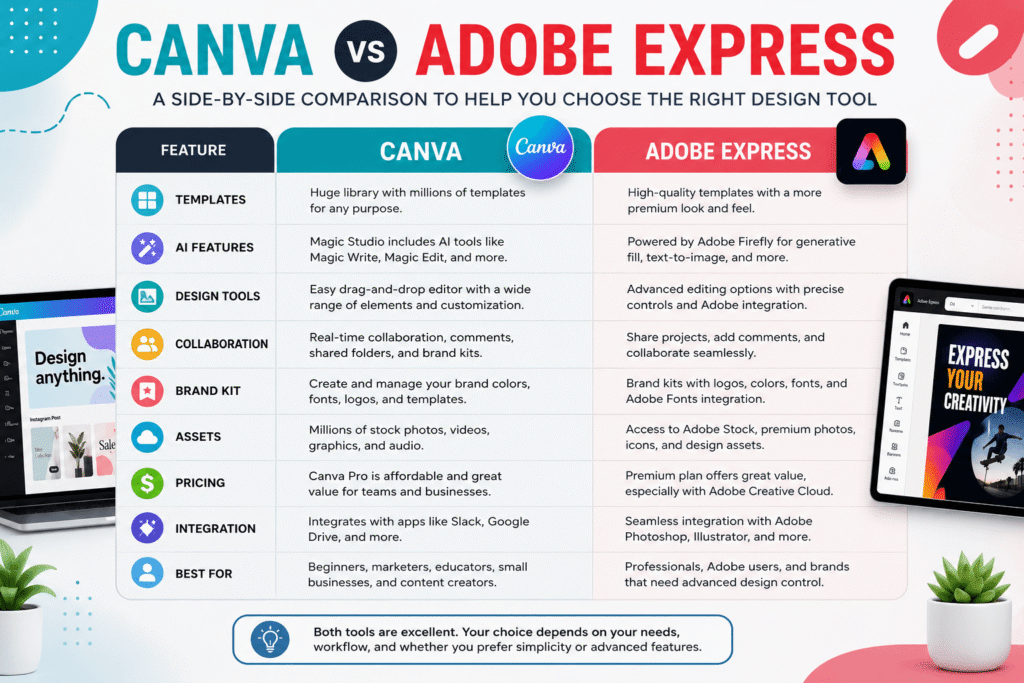
Canva vs Adobe Express Feature Comparison
Both platforms offer impressive design capabilities, but they focus on different strengths. Here’s a quick comparison to help you understand where each one excels.
Feature | Canva | Adobe Express |
Ease of Use  | ☆
| ☆
Templates | ☆
AI Features ☆ |
Brand Kit | ☆
Collaboration | ☆
Adobe Integration ☆☆☆ |
Content Scheduling | ☆
Stock Assets ☆ |
Learning Curve Very Easy | Easy
Canva vs Adobe Express Pricing Comparison
Price is often one of the biggest deciding factors when choosing a design platform. Fortunately, both Canva and Adobe Express offer free plans, but their premium subscriptions unlock additional features that can significantly improve your workflow.
Plan | Canva | Adobe Express
Free Plan | ✔ Yes | ✔ Yes
Premium Plan | Canva Pro | Adobe Express Premium
Team Plan | ✔ Available | ✔ Available
Free Trial | ✔ Yes | ✔ Yes
Cloud Storage | Included | Included
AI Features | Limited (Free) | Limited (Free)
- Millions of premium photos, videos, and graphics
- Brand Kit for consistent branding
- Magic Studio AI tools
- Background remover
- Content planner
- Premium templates
- One-click resize for multiple platforms
- Premium templates and assets
- Adobe Firefly AI features
- PDF editing
- Advanced branding tools
- Larger stock image library
- Integration with Adobe Creative Cloud apps
Ease of Use
When comparing Canva vs Adobe Express, usability is one of the biggest differentiators.
Canva’s User Experience
Canva is designed with beginners in mind. Its intuitive drag-and-drop interface allows users to create professional-looking designs without prior design experience.
Key advantages include:
- Clean dashboard
- Beginner-friendly interface
- Thousands of categorized templates
- Simple editing tools
- Minimal learning curve
Most users can create their first design within minutes.
Adobe Express User Experience
Adobe Express also prioritizes simplicity but includes slightly more advanced editing options.
Users familiar with Adobe products will appreciate:
- Familiar workspace
- Better file management
- More precise editing controls
- Adobe Fonts integration
- Adobe Stock access
While Adobe Express remains beginner-friendly, new users may need a little more time to become comfortable with its interface.
AI Features and Smart Design Tools
Artificial intelligence is transforming graphic design, and both platforms are investing heavily in AI-powered creativity.
Canva AI Features
Canva’s Magic Studio includes tools such as:
- Magic Write
- Magic Design
- Magic Edit
- Magic Eraser
- Text-to-Image
- Background Remover
- AI Presentation Generator
These tools help users generate content, edit images, and create marketing materials faster.
Adobe Express AI Features
Adobe Express leverages Adobe Firefly, one of the industry’s leading generative AI technologies.
Notable AI capabilities include:
- Text-to-image generation
- Generative Fill
- AI text effects
- Object removal
- Image expansion
- AI-powered templates
Adobe’s AI tools generally provide more advanced editing capabilities, particularly for users who require greater creative control.
Winner: Adobe Express takes the lead in AI-powered image editing and creative enhancements, while Canva excels in AI-assisted productivity for everyday design tasks.
Templates, Brand Kits, and Creative Assets
Templates save time and help maintain professional design quality.
Canva
Canva offers:
- Millions of templates
- Social media graphics
- Presentations
- Flyers
- Infographics
- Business documents
- Video templates
- Whiteboards
Its extensive template library is one of the platform’s biggest strengths.
Adobe Express
Adobe Express provides:
- High-quality premium templates
- Adobe Stock images
- Adobe Fonts
- Professional branding assets
- Creative Cloud integrations
Although Adobe offers fewer templates than Canva, the overall quality and customization options are excellent.
Collaboration and Teamwork
For businesses and marketing teams, collaboration features can significantly improve efficiency.
Canva Collaboration Features
- Real-time editing
- Shared folders
- Team Brand Kits
- Comments
- Approval workflows
- Content scheduling
- Version history
These features make Canva ideal for agencies, marketing teams, and remote collaboration.
Adobe Express Collaboration Features
Adobe Express supports:
- Shared projects
- Team libraries
- Brand management
- Cloud synchronization
- Adobe ecosystem collaboration
If your organization already uses Adobe Creative Cloud, Adobe Express integrates seamlessly into existing workflows.
Pros and Cons
Canva Pros
✔ Extremely beginner-friendly
✔ Massive template library
✔ Excellent collaboration tools
✔ Affordable pricing
✔ Strong content scheduling features
✔ Ideal for social media marketing
Canva Cons
✘ Limited advanced photo editing
✘ Some premium assets require Pro
✘ Less powerful than Adobe for professional editing
Adobe Express Pros
✔ Excellent AI capabilities
✔ Adobe Firefly integration
✔ Professional-quality assets
✔ Better photo editing
✔ Works seamlessly with Creative Cloud
✔ Strong branding features
Adobe Express Cons
✘ Smaller template library
✘ Slightly steeper learning curve
✘ Best value comes with Adobe ecosystem
Which Tool Should You Choose?
Choose Canva if you:
- Are a beginner
- Need quick social media graphics
- Create marketing materials regularly
- Want thousands of templates
- Collaborate with a team
- Prefer an easy drag-and-drop experience
Choose Adobe Express if you:
- Already use Adobe Creative Cloud
- Need advanced AI image editing
- Work with professional branding
- Create polished marketing campaigns
- Require higher-quality creative assets
For many users, the choice depends on workflow rather than features alone. Canva is ideal for speed and simplicity, while Adobe Express shines with its AI tools and integration with Adobe’s professional software.
Best Practices for Getting the Most from Either Platform
To maximize your results, follow these best practices:
- Define your brand colors and fonts before creating designs.
- Use templates as a starting point, then customize them to maintain originality.
- Organize projects into folders for easier access.
- Take advantage of AI tools to speed up repetitive tasks.
- Optimize images for web performance before publishing.
- Collaborate with team members using shared workspaces and comments.
- Regularly update your Brand Kit to keep your visual identity consistent.
Common Mistakes to Avoid
Even with user-friendly platforms, avoiding these mistakes can improve the quality of your designs:
- Relying too heavily on default templates without customization.
- Using too many fonts or colors in one design.
- Ignoring accessibility, such as poor color contrast or unreadable text.
- Exporting files in the wrong format or resolution.
- Overusing AI-generated content without reviewing or refining it.
- Forgetting to optimize graphics for different social media platforms.
Practical Checklist
Before publishing your design, use this quick checklist:
 Is the design consistent with your brand?
- Are fonts readable on desktop and mobile?
- Have you used high-quality images?
- Is the layout clean and uncluttered?
- Have you checked spelling and grammar?
- Did you export the correct file format?
- Is the design optimized for its intended platform?
- Have you reviewed AI-generated content for accuracy?
 Is the design consistent with your brand?
Call to Action
Ready to elevate your design skills and create visuals that stand out?
At Design Made Simple, we share practical tutorials, expert design tips, AI tool guides, branding strategies, and the latest industry trends to help designers and businesses succeed.
Whether you’re just getting started or looking to refine your creative workflow, our resources are designed to help you work smarter and design with confidence.
 Explore more expert guides on Design Made Simple and discover the tools, techniques, and inspiration you need to create stunning designs.
Frequently Asked Questions (FAQs)
1. Is Canva better than Adobe Express for beginners?
Yes. Canva is generally the better option for beginners because of its intuitive drag-and-drop interface, extensive template library, and minimal learning curve. Most users can start creating professional-quality designs within minutes.
2. Which platform offers better AI features: Canva or Adobe Express?
Adobe Express currently has an advantage in advanced AI image editing through Adobe Firefly. However, Canva’s Magic Studio provides excellent AI tools for generating content, editing images, and streamlining everyday design tasks.
3. Can I use Canva and Adobe Express for free?
Yes. Both platforms offer free plans that include essential design features. Premium subscriptions unlock additional templates, AI tools, branding options, and larger asset libraries.
4. Which platform is better for small businesses?
Canva is an excellent choice for small businesses because of its affordability, collaboration features, Brand Kit, and marketing-focused templates. Adobe Express is a strong alternative for businesses already using Adobe Creative Cloud.
5. Which design tool should marketers choose?
For most marketers, Canva provides a faster workflow for creating social media graphics, presentations, and promotional materials. Adobe Express is better suited for teams requiring advanced editing capabilities and integration with Adobe’s professional software.
Conclusion
The Canva vs Adobe Express comparison highlights two outstanding design platforms, each with unique strengths.
Canva excels in simplicity, collaboration, and an unmatched collection of templates, making it the go-to choice for beginners, marketers, educators, and small businesses. Adobe Express stands out with its professional-grade editing capabilities, Adobe Firefly AI, and seamless Creative Cloud integration, making it an excellent option for experienced designers and Adobe users.
Rather than asking which platform is universally better, consider which one best aligns with your creative needs, budget, and workflow. Both tools continue to evolve with new AI-powered features, making professional design more accessible than ever.
No matter which platform you choose, focusing on consistent branding, accessibility, and high-quality content will help you create visuals that engage your audience and support your business goals.